zvoove · Platform Experience & AI
From individual products to one shared platform.
I designed Launchpad, zAIn and Notification Center as one AI-enriched platform experience — from strategy to the production frontend, with reusable foundations for Product and Engineering.
- Role in the project
- Sole designerAcross teams · zvoove Germany
- Collaboration
- PMs, dev leads & EngineeringFeature teams in trios
- Responsibility
- Strategy to design engineeringResearch · AI experience · Design system
- As of September 2026
- Launchpad · zAIn · Notification Center
Live since August 2026+3
As of September 2026
Live
Since August 2026: Launchpad, zAIn, Notification Center · 16 cloud customers, 12 active
Limited
48 write endpoints behind the human gate, not shipped
Proof
Action Center and Decision Card, not shipped yet
Not measured
Impact: no before-and-after comparison
Lena’s morning · eight scenes
01
Another overview would not solve the problem.
To make a decision, Lena has to find and combine information from several programs herself.
Starting point
02
Monday, 05:52. Two shifts are still unfilled.
Lena plans staffing for three branches. By six, she needs to know who can cover the shifts. The information is spread across different programs.
Lena’s workday · reconstructed
zvoove One · Staffing×zvoove One · Time tracking×Payroll×Absences – overview×zvoove Expert Mode×Inbox (37)×Shift plan wk 43.xlsx×zvoove Cloud · Applicants×Customer portal×Wiki – shift rules×Reporting×zvoove One · Orders×Time accounts×Inbox – North×+zvoove One · StaffingLena · Monday
NewEditDeleteExportFilter
Staff no. Name Customer Assignment Status 1042 B., Jana Logistics North Mon 06:00 sick 1077 K., Marco Logistics North Mon 06:00 open 1103 S., Ali Warehouse South Mon 14:00 planned 1119 W., Eva Warehouse South Mon 14:00 planned 1150 T., Lukas Logistics North Tue 06:00 open 1188 P., Nora Retail Centre Tue 08:00 planned Inbox (37)Lena · Monday
- North · Who covers Mon 06:00?
- Customer South · Invoice October
- J. B. · sick note (forwarded from WhatsApp)
zvoove One · Time trackingLena · Monday
- M. K. · 38 of 40 hours
- T. L. · 31 of 40 hours
- 7 timesheets missing · wk 42
Absences – overviewLena · Monday
- J. B. · sick · from Monday
- S. A. · holiday · 3–7 Nov
- 2 requests open
zvoove Expert Mode · Shift planLena · Monday
- Mon 06:00 · 2 unfilled
- Mon 14:00 · filled
- Tue 06:00 · 1 open
PayrollLena · Monday
- Payroll run October · waits for timesheets
- Advances · 2 open
- Statement wk 42 · locked
03
My first design solved the wrong problem.
A shared interface looked tidier. In the customer session, the work of finding and checking information stayed the same. I dropped that approach.
My decision · December 2025
StaffingMon 06:00 · 2 shifts open
TimeM. K.: 38 of 40 hours
PayrollPayroll waits for timesheets
AbsencesSick note J. B. · from Monday
Expert ModeShift plan: Mon 06:00 unfilled
MailNorth: who covers Mon 06:00?
zvoove · Launchpad×+zvoove One · StaffingLena · Monday
NewEditDeleteExportFilter
Staff no. Name Customer Assignment Status 1042 B., Jana Logistics North Mon 06:00 sick 1077 K., Marco Logistics North Mon 06:00 open 1103 S., Ali Warehouse South Mon 14:00 planned 1119 W., Eva Warehouse South Mon 14:00 planned 1150 T., Lukas Logistics North Tue 06:00 open 1188 P., Nora Retail Centre Tue 08:00 planned Inbox (37)Lena · Monday
- North · Who covers Mon 06:00?
- Customer South · Invoice October
- J. B. · sick note (forwarded from WhatsApp)
zvoove One · Time trackingLena · Monday
- M. K. · 38 of 40 hours
- T. L. · 31 of 40 hours
- 7 timesheets missing · wk 42
Absences – overviewLena · Monday
- J. B. · sick · from Monday
- S. A. · holiday · 3–7 Nov
- 2 requests open
zvoove Expert Mode · Shift planLena · Monday
- Mon 06:00 · 2 unfilled
- Mon 14:00 · filled
- Tue 06:00 · 1 open
PayrollLena · Monday
- Payroll run October · waits for timesheets
- Advances · 2 open
- Statement wk 42 · locked
New interfaceSearch all apps …✦ Chat
zvoove One · Staffingsame app as before
Name Customer Assignment Status B., Jana Logistics North Mon 06:00 planned K., Marco Logistics North Mon 06:00 open S., Ali Warehouse South Mon 14:00 planned What happens hereJ. B. is sick, but the shift plan still says "planned". The sick note has not been passed on.A nicer frame, the same apps underneath: they still do not talk to each other.
04
The programs stay. The case comes together.
I focused the design on a shared task: connect the sick note, shift plan and hours without replacing the existing programs.
My decision · connect the information
Each program keeps doing its job
StaffingTime trackingPayrollAbsencesExpert ModeInboxOne shared platform
MessagesWhat is happening
DetailsWhat Lena needs to know
Sign-in and accessWho can see and change what?
Switch between programsAll programs in one place
05
Four messages. One task for Lena.
In the target experience, the assistant spots the unfilled shifts. Lena receives the case with its supporting information before she has to search.
Target experience · illustrative data
StaffingMon 06:00 · 2 shifts open
AbsencesSick note J. B. · from Monday
Expert ModeShift plan: Mon 06:00 unfilled
MailNorth: who covers Mon 06:00?
4 messages → 1 task
2 shifts on Mon 06:00 unfilled
detected 05:51 · before anyone asked
StaffingAbsencesExpert ModeMail06
Two hours available. An eight-hour shift.
I replaced the percentage with reasons people can check. M. K. does not have enough hours left. Lena needs to see that before approving anything.
My decision · show the unresolved question · target experience
Proposed by zAInDecision · Review staffing Cover two open shifts
Monday, 06:00 · Logistics North · 8 hours per person
Not ready for approvalM. K. only has 2 hours available. The shift needs 8.
M. K.6 hours short2 of 8 hours covered2 hours available
T. L.Fits the shift8 of 8 hours covered9 hours available
Assessment: well supportedBased onShift planHours balanceQualification
The hours conflict is documented. A replacement for M. K. is still needed.
07
Resolve the open question. Then approve.
The chat picks up the prepared case. Lena asks for an alternative to M. K., checks the revised proposal, then approves both shifts.
Target experience · execution not yet shipped
What happens herezAIn prepares, Lena approves⌂Notification Center›J. B.Monday, 19 October 2026
Tasks (9)
InboxDone
OVERDUE3
ShiftUnfilled shiftJ. B. — Logistik Nord◷ due Mon 05:30✦ Hand to zAInTime limitAssignment time limit exceededS. M. — BMW◷ 3 days overdueSafetySafety briefingT. F. — Siemens◷ 5 days overdueJ. B. — Logistik Nord✓ Mark done
✦zAIn can propose a replacement for J. B. on Mon 06:00.Hand to zAIn
URGENCY
StatusOverdue
DueMo 05:30
TypeSHIFT
08
One case done. The next stays open.
In the target experience, all programs show the filled shifts. The timesheets still wait for Lena. Prepared does not mean completed.
Target experience · Lena’s home page
What happens hereOne case completed, the next still open⌂HomeMonday, 19 October 2026
Your morning at a glance
The early shifts are covered. Next up: the timesheets.
Prepared by zAInDecision · Needs your reviewMatch 12 timesheets
Week 42Time trackingStaffing
The matching proposals are ready. Check which assignment each timesheet belongs to.
Already prepared: timesheets and assignments brought together.Review matching
Prepared matching · week 42- Scope
- 12 timesheets
- Compared with
- Assignments in the shift plan
- Your review
- Do person, assignment and hours match?
The proposal is open for review. Nothing has been approved or carried out.
Only your approval changes the assignment.
Done today
Mon 06:00 filled · T. L. + E. W.Approved by you. Both shifts saved in the shift plan.
One shared state across programsThe updated shift plan is available to the other programs. No need to enter it again.
As the only designer, I designed the platform and created the components other teams now build with.
The opportunity was not another dashboard.
My first hypothesis was the obvious one: a shared shell with launcher, tabs, search, a small dashboard and a persistent AI chat. I built it alone in Figma Make in four days and showed it four days later to a staffing agency, a customer since 2018. They liked the interface. The value assumption did not hold.
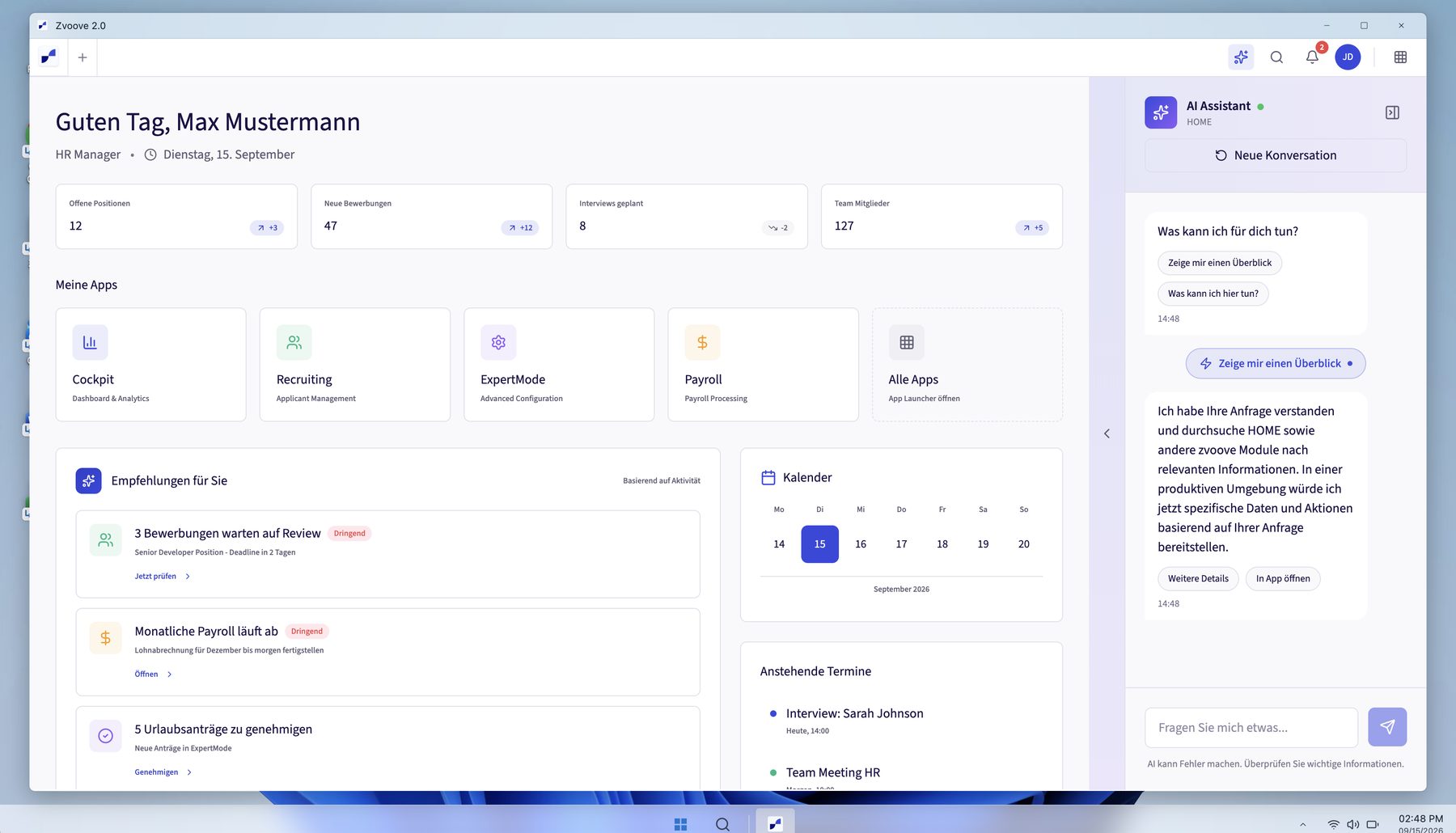
“A product world with bad interfaces doesn’t need to become a beautiful product world with bad interfaces — especially not if the beauty costs a lot of money again.”
The reason was not the interface but the landscape behind it. Fifteen years of acquisitions had left classic ERP, Expert Mode and cloud products side by side, and two earlier platform attempts had not brought them together. Users found the information but had to reconstruct the case themselves across tabs, systems and WhatsApp before they could decide. They spoke of eight to twelve context switches a day and two to three minutes to reorient after each. That is anecdotal, not measured.
A better frame reduces navigation. It does not reduce this reconstruction. So I discarded the prototype instead of defending it. And more than a prototype was at stake: Launchpad, zAIn and Notification Center are part of every zvoove One bundle, available from summer 2026.
Twenty-four hours later, the next customer said the opposite.
Two customers, the same prototype, one day apart, opposite verdicts. That is not a research error but the evidence that one fixed entry point would have been the wrong answer.
December 2025
Small team · personal oversight
The classic overview is seen as unhelpful day to day — with a manageable team size you already know the situation. What matters is fast access to a single fact.
Chat · priority 1 · Dashboard · lowDecember 2025 · one day later
Larger operation · Expert Mode
Chat is rated “nice to have, but not essential”. The dashboard, by contrast, replaces the laborious search inside Expert Mode and is seen as the real gain.
Chat · nice to have · Dashboard · priority 1
The contradiction became three variants instead of a compromise: task-first, AI-first and hybrid mix. A session in August 2026 favoured the hybrid mix. That is a signal, not a validation.
I tested every direction against real work.
At zvoove, research was not a phase before the work but the corrective for every direction. Six moments overturned or carried a decision.
Research in numbers
~20
zAIn interviews, together with the PM
9
interviews on the Safety Manager, 5 external, 4 internal
2
customer shadowing sessions
11
participants in the discovery workshop
3
customers in the validation track
4
personas from the user insights synthesis
Further stops: Research Hub (July 2025), Safety Manager interviews, internal interviews with customer support, sales, key account and product, Master Unified Entry Experience, zCom, validation track with three customers.
Four personas, one pattern
Dispatch
- Sick notes via WhatsApp, calls or SMS, typed into the ERP by hand
- context switches between ERP, phone, email and WhatsApp
Payroll and admin
- statutory deadlines without proactive warnings
- missing and faulty timesheets at the start of the month
Branch management
- figures only through manual reports
- no early warning on negative trends
Recruiting
- applications across many channels without a central view
- documents and work permits checked by hand
Shared pattern
All four roles reconstruct the case themselves before they can decide.
“If zvoove’s future product world looks LIKE THIS … it would be the first time in years that I’d even open a zvoove product again!”
“We really need an AI chat like this that knows the zvoove context. It makes a lot easier.”
Four roles, one job: understand the case before you decide.
The personas say who works with zvoove. For the platform, what counted was when and what for. So the pain points from the synthesis appear here as job stories: situation, motivation, expected outcome. The role sits beside the sentence, not in it.
The four jobs to be done we identified share one core: understand the case before deciding, without piecing it together from several products. Per role, it looks like this:
DispatchJob story
- When
- a sick note comes in via WhatsApp, a call or SMS,
- I want
- it in the system without typing it in,
- so
- I can restaff the assignment instead of switching between channels.
Payroll and adminJob story
- When
- the month starts,
- I want
- to see which timesheets are missing or wrong and which deadline is next,
- so
- payroll goes out on time and right.
Branch managementJob story
- When
- a figure in my branch turns,
- I want
- to know without building a report,
- so
- I can act while there is still time.
RecruitingJob story
- When
- applications arrive across many channels,
- I want
- them in one place, documents and work permits checked,
- so
- no good application is left waiting.
The platform had to carry context, not just navigation.
After the customer test the shared entry point still made sense, just not as the main value. The open question was technical: can the landscape carry context across product boundaries without migrating everything first? I built a technical proof in React and TypeScript on our production stack: two separate products in one shell, tested on the running system instead of in an architecture slide.
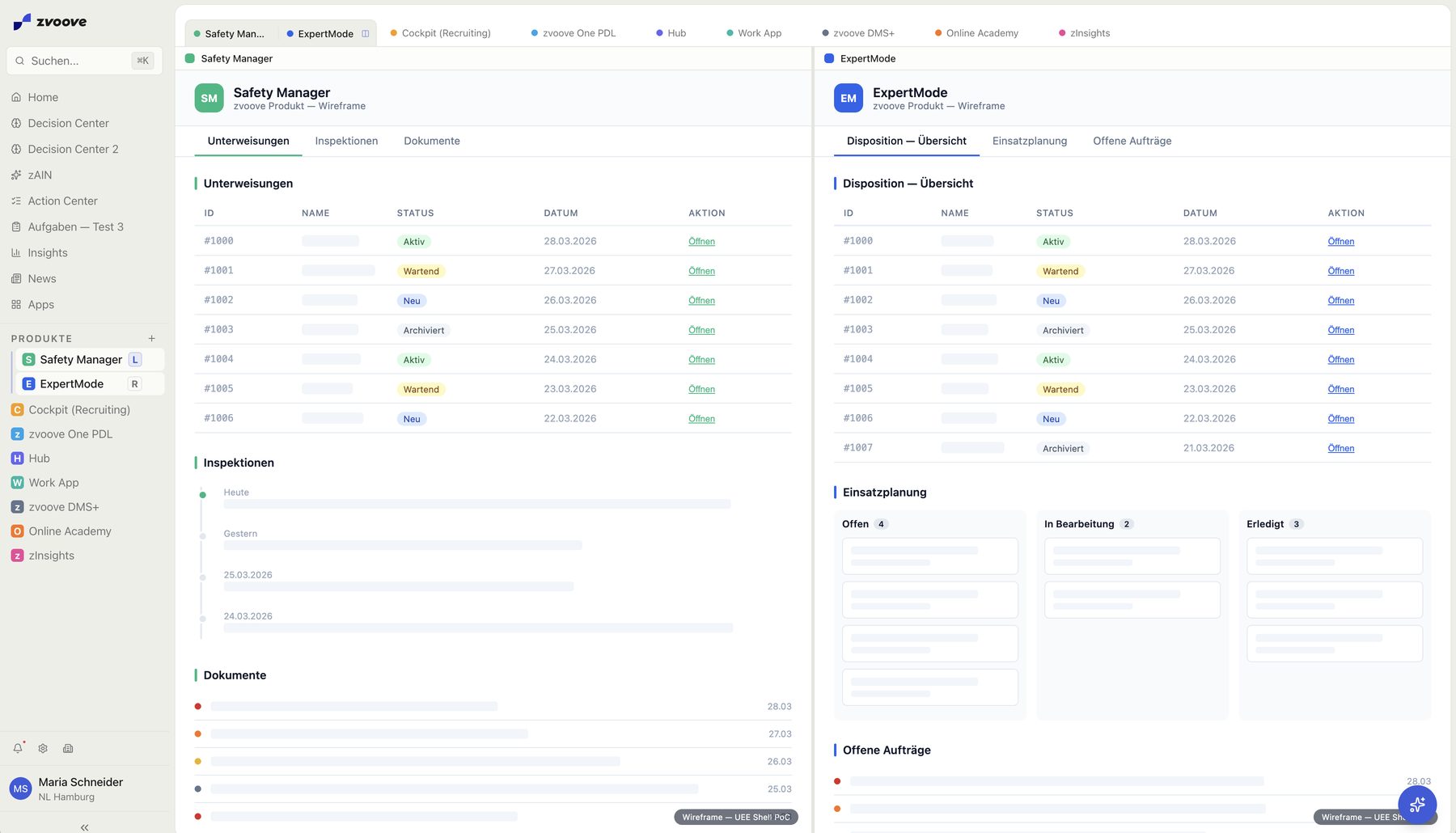
Classic ERPLegacy
own domain logic
Expert ModeLegacy
own domain logic
Cloud productsCloud
own domain logic
Platform experience · Launchpad
- Identity
- Permissions
- Navigation
- Signals
- Relevant context
Domain logic stays where it is owned
Only what is needed across product boundaries becomes shared: identity, permissions, navigation, signals, context.
Not every product needs the same integration depth
Legacy and cloud connect at different depths; for users it stays consistent. Migration is not a precondition.
The proof became the central platform
The platform experience went live with Launchpad and is set down in the product guardrail as the central platform.
Scope
152 → 25
152 pages of legacy rights condensed into 25 roles.
1 day
I built the login (16 screens in 3 layouts) in one day with Cursor, from the documentation and our design system.
The shared entry became a work model.
With UEE I had defined the shared entry and prototyped it in code. It became Launchpad 2.0, where zAIn, the Notification Center and Timesheet Automation dock today. That settled where work arrives. What remained open was how people and AI get it done across product boundaries.
For that I developed UWX, the Unified Work Experience: the shared model for AI-supported work across all zvoove products. UWX is not a product of its own. Product, Design and Engineering align to it.
Context travels along.
Moving from one product to the next does not mean rebuilding the case.
AI where the work happens.
In the background it sorts and prioritises signals; it shows up in the feature, in the Notification Center or in a conversation with zAIn.
Autonomy in levels.
Manual, assisted, prepared, autonomous. Which level applies depends on context, permission and confidence; the last one is the target.
Approval is part of the model.
Where a decision has consequences, a person decides, and that is designed in from the start.
I finished defining UWX in September 2026 in the 3/6/9 prototype, a vision system for the product managers. In it, PMs build live-like prototypes, and UWX is their operating system: anyone designing a new flow gets the model automatically.
Today UWX is established. The product managers and their teams work with it, and it is anchored in the product strategy for 2026 and 2027.
See also:UWX · Unified Work Experience
AI had to start before the prompt.
A chat as the starting point comes too late. It assumes someone has already recognised, framed and phrased the problem, and according to the interviews that was the most expensive work.
So the AI had to start before the prompt: recognise relevant work, assemble context, prepare the next step. That is in operation. The assistant knows where in the platform someone is working and proposes from that context.
Signal
An event, an exception or a deadline appears.
Context
The system assembles only the relevant context.
Proposal
The next step is prepared, not merely suggested.
Approval
The prepared step becomes a deliberate human decision.
Action
Executed, escalated or stopped — logged and traceable.
The workflow starts at the signal, not the prompt — and carries context through to the decision.
That led to a division of work between surfaces, instead of making chat the universal interface.
NotificationMakes relevant work visible before anyone goes looking. Ordered by deadline and consequence, not by timestamp.
Notification Centerby deadline and consequence
- KHSick note — Karim HaddadDB Schenker Hamburg · cover for the early shift3 replacement candidates prepared, message to the customer draftedCritical
- KKOpen shift — Klaus KleinAudi GmbH · 11 May, 06:00Anna Berger suggested · approval neededHigh
- Safety briefing due4 employees · Bosch AGDates suggested from the training calendarMedium
Open case
ChatClarifies and orchestrates. Strong on single facts, exploration and situations in motion. Weak on comparison and bulk handling.
- How many hours did Anna Berger work in May?A10:02
- 38.5 hours in May, 6 of them on the night shift. Shall I open the timesheets?10:02
- Combined from 22 timesheets in May
Structured UICarries evidence, approval and state. Many cases side by side, sortable, with a full history per decision.
Cases4
| Case | Customer | Due | Status | zAIn suggestion | History |
|---|---|---|---|---|---|
| Early-shift cover | Audi GmbH | 11 May | Approval open | Schedule Anna BergerWell supported | |
| Sick note | DB Schenker | today | In review | Request the sick noteUncertain | |
| Extension | BMW Leipzig | 14 May | Prepared | Extend by 3 monthsWell supported | |
| Cancellation | VW AG | 16 May | Done | — |
The decision state must not fall apart when moving between these surfaces. That is why the prepared case needed its own persistent place.
That place is the Decision Object: a unit of its own with priority, context, proposal, rationale and open uncertainty, which persists after the decision.
Working-time conflict before payroll close
- Recorded working time
- 14 h+4 h over limit
- Daily limit
- 10 h
zAIn · Why well supported?
- Rule
- daily limit unambiguous.
- Context
- case data complete.
- Uncertainty
- an earlier exception, but in a different context.
- To be checked before approval.
See also:zAIn · the assistant
Complexity in the analysis. Clarity in the decision.
My aim was to keep complexity in the system, not with the user. Decision compression condenses a prepared case to what a deliberate decision needs: what happened, what the system proposes, why, and what uncertainty remains.
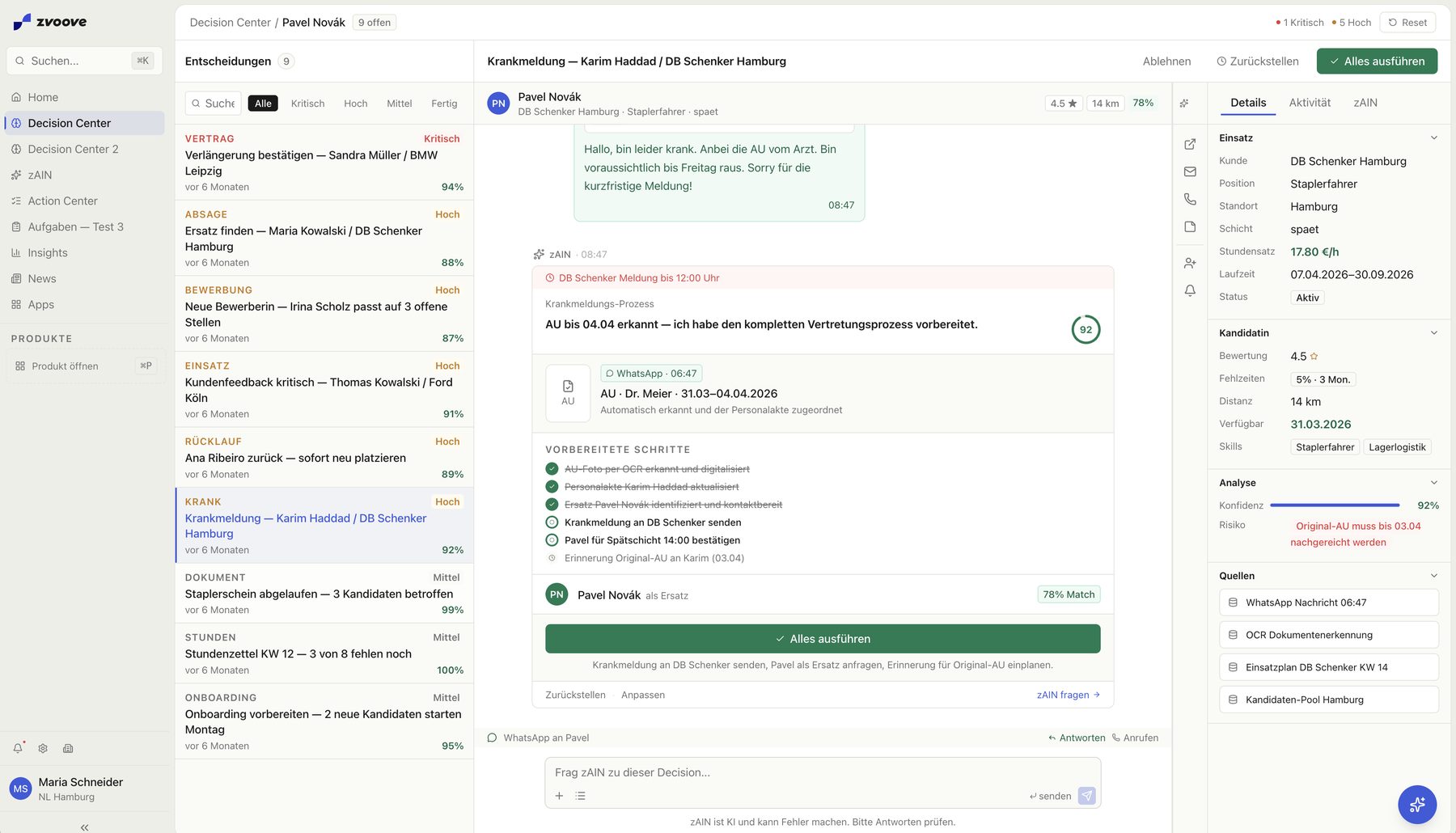
The screenshot still shows a percentage. I walked it back. Google PAIR, the HHAI 2025 literature and the interviews showed the same thing: decisions need interpretable uncertainty, not apparent precision.
Withdrawn
92 % confidence
A percentage does not say what the assessment rests on or what would overturn it.
Evolved
Assessment with rationale
Interpretable uncertainty instead of apparent precision; colour orients, the popover shows what it is made of.
Decision relevance before completeness
The flow shows only what affects trust and the decision; the rest stays reachable.
Interpretable uncertainty instead of a percentage
Named qualitatively, with the rule basis, open uncertainty and the next check.
Bundle context, layer detail
Evidence stays on the Decision Object; details appear on demand.
A standard case in about five seconds
A design target for prepared standard cases, not a time limit for consequential decisions.
Autonomy needed visible boundaries.
The closer a prepared case came to a real system change, the more convenience turned into liability. I needed three things that work together: autonomy by impact, escalation without loss of context, and an approval that stays visible in the interface.
Autonomy follows the consequence of an action
The PM classified the 154 backend endpoints by read and write rights, and as a trio we decided the boundary together. 106 run read-only at launch. The 48 write endpoints sit behind the human gate, deliberately not in the first release. What counted was impact, permission and reversibility, not a score.
154 backend endpoints by read and write rights
- 106 69 %read, enabled in the first release
- 48 31 %write, behind the human gate
Read
Retrieve context, Join data, Check rules
Allowed before approvalPrepare
Form a proposal, Show consequences, Stage the action
No system change yetChange
Write data, Change status, Execute action
Human Gate
The boundary sits at the kind of action, not at a threshold someone can turn up.
The score is a switch, not a display.
Confidence does not decide what the person reads but which route the case takes. Four bands, four routes.
Confidence
- Take care of Klaus Klein.A10:01
- I am not sure what you mean: the open shift on 11 May or today’s sick note?10:01
- The open shift.A10:01
- 10:01
Refill shiftApproval required
I will prepare a replacement. Nothing runs until you approve.
Runs after approvalDeclineApprove
- Find a replacement for Klaus Klein at Audi GmbH on 11 May 2026.A10:01
- The shift has two assignments: 06:00 and 14:00. Which one should I cover?10:01
- One question instead of an assumption
- Replacement for the early shift on 11 May, 06:00.A10:01
- I found ABAnna BergerBest matchExperience at Audi GmbH · 8 km · available nowJWJonas WeberSame qualification · 14 km · availableLDLeyla DemirSame qualification · 21 km · briefing needed with matching qualifications. Anna Berger fits best: experience in the same area, available now.10:01
- 10:01
Fill shiftApproval required
Schedule Anna Berger for Audi GmbH on 11 May 2026, 06:00.
Runs after approvalDeclineApprove
- Timesheet week 19 matched automatically
- Done: 12 timesheets of week 19 matched to their assignments and logged in the Notification Center. Can be undone at any time.10:01
BetaPlease check all AI-generated content carefully.
Escalation without losing context
When rules collide or permission is missing, escalation must not be a restart: the most repeated finding from the customer interviews.
- System
Boundary detected
Hands over the prepared case instead of acting further. It stops before the action, not midway through it.
- Handed over
Decision context
- Trigger and relevant data
- rules applied
- proposal and rationale
- open uncertainty
- Human
Judgement stays connected
Check, adjust, decide — from the state the system reached, not from the state before the signal.
What is handed over: the situation, the next step and what remained open.
Governance stays visible in the interface: in the chat as a three-layer pattern
Understand
Interpretation, clarification, handoff. What the system understood is visible before it plans anything.
MessageReplacement for the early shift on 11 May.AUnderstood: a replacement for the early shift on 11 May, 06:00, customer Audi GmbH.Plan
Sequence and steps. For write actions the approval sits here — the action is visible before execution.
IntentPlan · 3 stepsApproval required
Check candidates → schedule Anna Berger → inform the customer
Runs after approvalDeclineApproveDecide
Output, confirmation, next step. The result stays attached to the case and remains traceable.
ResultPlan · 3 stepsDone
Check candidates → schedule Anna Berger → inform the customer
Anna Berger is scheduled and logged on the case. Can be undone at any time.
Autonomy, handoff and approval are written down as reusable rules.
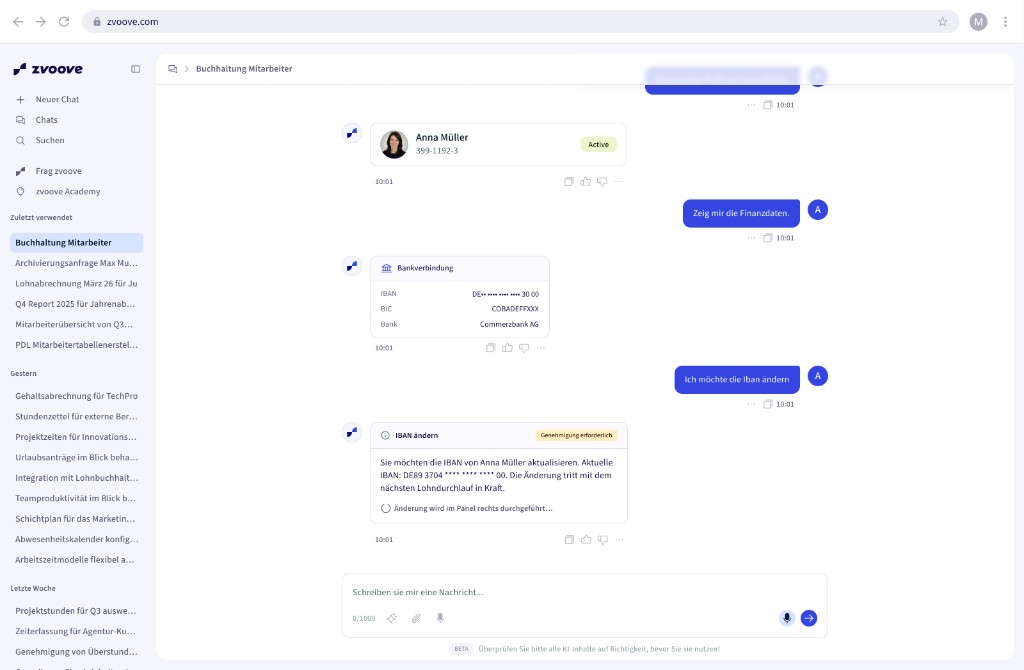
Not being the bottleneck.
As the only designer in the German unit I had to solve two things at once: turn product questions into testable artefacts quickly, and create a way of working in which product and engineering do not wait for design.
My principle is fact first: make hypotheses visible early, test them and discard them when the evidence says so. Code is part of my design medium; I build into production code. Engineering decides architecture and operations. I bring the user case, the working proof and the question of what the system owes the person.
Explore
Make the product thesis testable
While the experience is still moving. Four days to customer validation.
- Figma Make
Prove
Test behaviour in the real system
When behaviour is part of the hypothesis: on the real stack.
- React/TS
- Cursor
- design system
Enable
Make what worked reusable
What held up becomes a component, token or rule.
- Design system
- skill repository
As close to code as makes sense, as cheap to change as necessary.
The design system carries all of it.
The modes only work on the same substance. So that prototype, proof and product don't drift apart, all three draw on UnityUI, zvoove's existing design system. I developed its Figma library further and, with the frontend lead, made the system AI-ready: prototypes in Figma Make, Claude Design or Cursor are built on real components.
UnityUI
I own UnityUI on the design side. One source, one version: deviations surface in the pipeline, not in review.
Code · package registry
Products build on the published package.
Design tool · Figma
The same version as in code.
AI tools
Defined with the frontend lead: prototypes are built on real components.
Figma Make · Claude Design · Cursor
What actually held up.
The shipped core is broader than the prototype it came from, but not everything in the target picture is live. Keeping those states apart is part of the case.
The team built the pilot product, with me in the middle of it in production code with Cursor: Launchpad 2.0 as the shell, SSO connected to Rights & Roles, platform settings, search, zAIn with its integration and the Notification Center with AI enrichment.
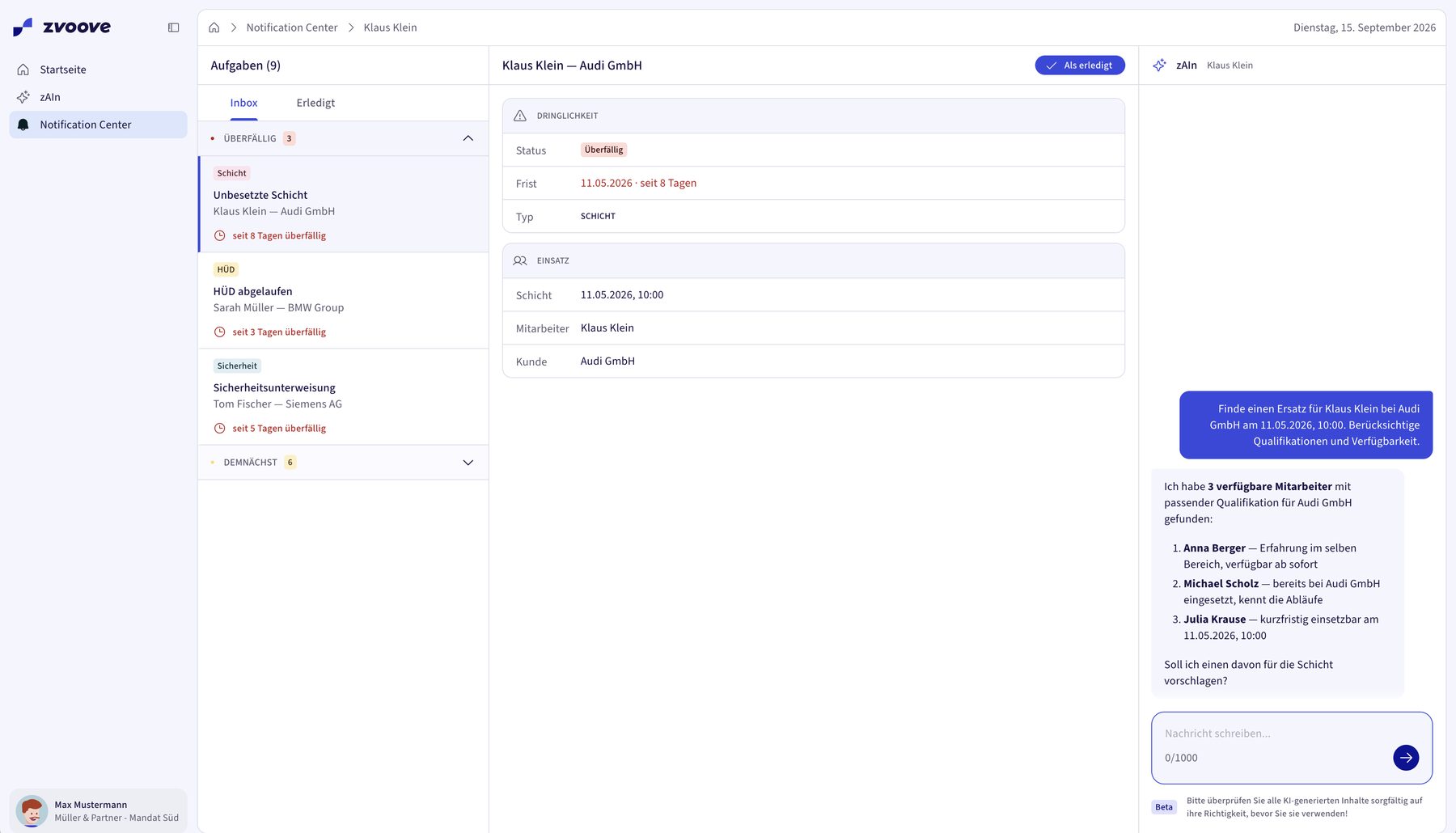
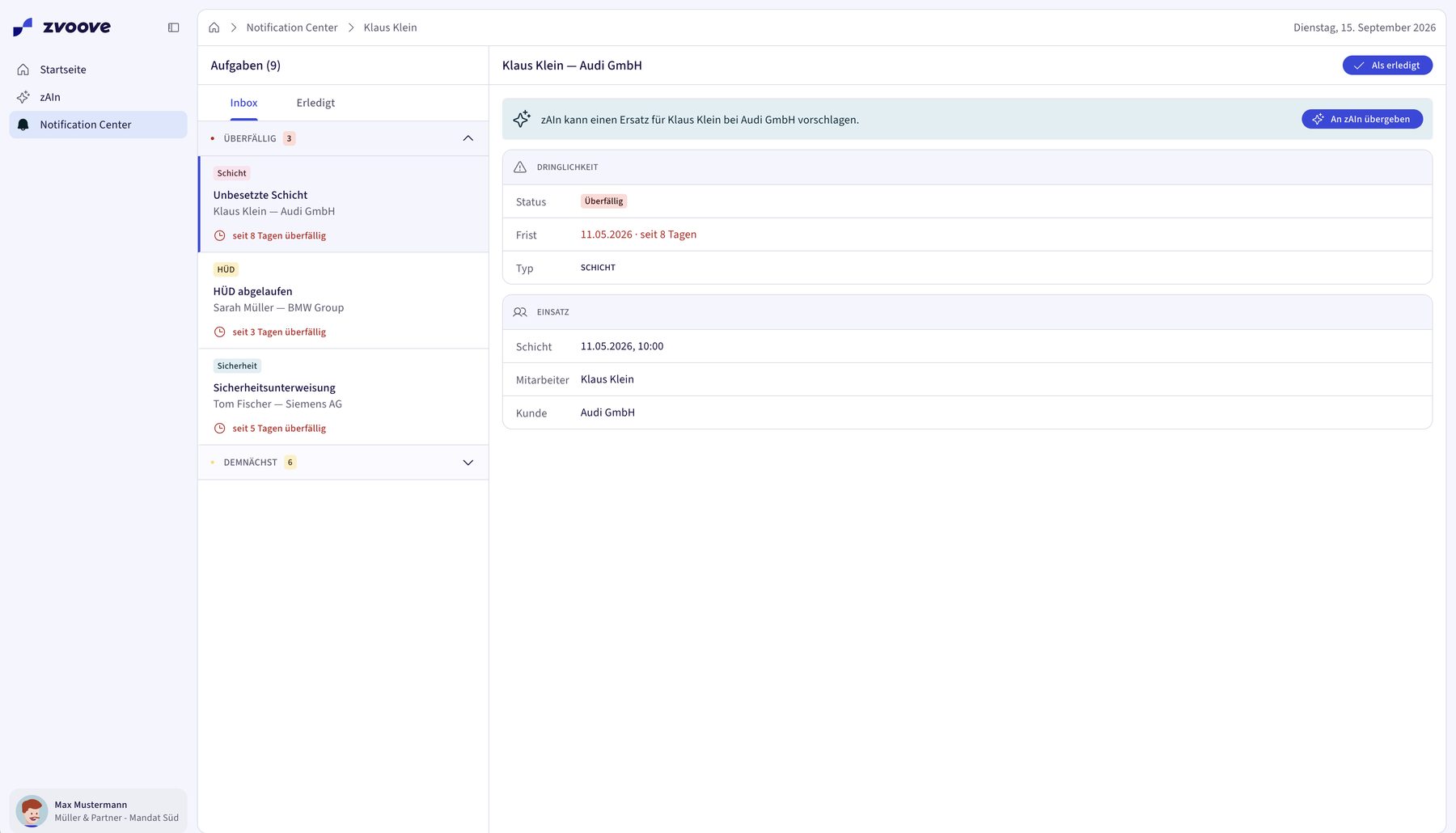
In productionLive4 entries
Platform experience
Shell, app launcher, rights and roles, settings; anchored as the central platform.
Signals · Notification Center
Deadline- and risk-relevant signals, prioritised by impact. I built the frontend and shipped it with a backend engineer. Eight weeks were planned. After two I was moved to other priorities; the frontend was done, the backend half done.
Context-aware assistant
Proposes from the context of where someone works; context can also come from a notification.
Enablement
Skill repository, UnityUI guardrails and tool setup run in production.
Design & proof2 entries
Human gate and confidence
Limited
Patterns designed; the write endpoints are not shipped.
Action Center and Decision Card
Proof
Technical proof started, not shipped yet.
Pending1 entry
Impact
Pending
No before-and-after measured; that would need a baseline and telemetry.
As of September 2026
Live since August 2026
Launchpad, zAIn and Notification Center. Rollout in progress.
16 cloud customers · 12 active
First GA wave. Usage, no measured business impact.
106 read · 48 write
154 endpoints classified; write access outside the first release.
Action Center and Decision Card: technical proof, not shipped yet. Fewer context switches and shorter handling times have not been measured as impact.
The shift
At the start, the human was the integration layer between products. The target picture inverts that relationship: the system carries signal and context through to the decision — the human brings judgement and authority.
What carries over, and what remains open.
The patterns are not tied to staffing. They apply wherever AI prepares decisions with real consequences: money, people, compliance.
Four patterns
Pattern 01
Authority stays with the person when the decision moves money
The system recognises, prepares and explains. Approval stays with the person who carries the consequence, from the start, not as a safety layer added later.
Pattern 02
Read before write, opened in stages
What the system may not do is designed as deliberately as what it may do. It opens by impact, permission and reversibility.
Pattern 03
Autonomy is a level per decision type, not a switch for the product
Filling a routine shift and changing someone’s pay are not the same decision.
Pattern 04
Escalation is a handover format
Whoever takes over should see that someone carries on, not that something starts from scratch.
Research Hub
Central repository and method templates set up anew
July 2025Safety Manager interviews
9 interviews, 5 external, 4 internal
July–Aug. 2025Shadowing
2 customers, prototype shown on site
Dec. 2025Internal interviews
Customer support, sales, key account and product
from Dec. 2025zAIn interviews
about 20 qualitative interviews, together with the PM
to Jan. 2026Discovery workshop
11 participants from product, UX and engineering
Jan. 2026User insights synthesis
4 personas, pain-point matrix, jobs to be done
March 2026zCom
quick validation with early prototypes
May 2026Validation track
3 customers, Launchpad and Notification Center
June 2026Innovation Roundtable
Customer tests of zAIn, Timesheet Automation and the Onboarding Agent; lightning rounds and persona interviews
July 2026
Role and craft · four proof points
Alongside the running product business, UWX took shape: the AI experience across all products. There was no brief and no established pattern; as the only designer I defined the area from the ground up, from contextual AI and signals to human-in-the-loop. Today UWX is established and in use.
Four days to customer validation
The first hypothesis was in front of a customer after four days as a running prototype. One session later I discarded it rather than defend it — the tangible thing first, the insight second.
Shipped beats complete
The Decision Center was designed but too large to ship. Cut back to a notification experience — with the data structure underneath that later becomes decision objects. The slice went live.
Run the interviews and steer by what they say
Interviews, shadowing and support conversations run and analysed myself — and the product direction re-aimed twice because of them. Research as a corrective, not as confirmation.
Others build without waiting for me
Product and engineering produce testable prototypes themselves. What comes out is consistent because the foundation is given — not because I saw every file.
What remains open
Does the Action Center carry decision state in the real system?
The technical proof is running. The test is whether the same case stays understandable across notification, chat and feature.
Does the system actually reduce reconstruction work?
Not measured yet; that needs a baseline and telemetry.
Where can autonomy grow without diluting authority?
For write actions on personnel data, purpose limitation, data minimisation and a traceable record become design requirements.
Assumption 01
The level of work shifts
Pre-sorted signals arrive on one surface. The person reads, approves or thinks along briefly. Not less work, but less reconstruction before it.
Assumption 02
Trust moves from the interface to the model
Then what is bought is not the tool but the confidence, and pay-per-call pricing becomes the obvious form.
Assumption 03
The uncomfortable consequence belongs to the design
What is relief for the decision-maker is loss for the role below. That has to be part of the design thinking.
TL;DR: My contribution to zvoove
I led the shared Platform Experience from the first prototype into production, with Product and Engineering. Launchpad, zAIn and Notification Center are live; UWX is embedded in the 2026/27 strategy as the AI experience across products.
Each product on its own
- Shift planning
- Working time
- Absences
Human searches and reconciles
The case comes together in their head.
One connected workflow
- Shift planning
- Working time
- Absences
SignalContextProposal
Strategic goals
- One shared platform
- Connect existing and new products without rebuilding their domain logic.
- AI that prepares the work
- Carry signal and context through to the decision. Approval stays with the person.
- Scale product development
- Enable teams to build independently with shared patterns, UnityUI and AI skills.
fin (for now)